Debug, visualize, and operate your robots from a single browser tab.
Monitor topics, visualize bags, inspect lifecycles, and automate workflows.
Trusted by students who want to ship fast




Everything you need to monitor, debug, and control your ROS applications
Configure and manage your connection to the ROS bridge server with WebSocket URL, transport protocol, and auto-reconnect settings.
Configure your ROS bridge connection parameters
WebSocket URL
The WebSocket URL for rosbridge server
Transport Library
Monitor and interact with ROS topics, services, and parameters in real-time. View message types, service definitions, and parameter values.
Topic Name
/joint_states
Message Type
sensor_msgs/msg/JointState
Service Name
/move_group/list_parameters
Service Type
rcl_interfaces/srv/ListParameters
Request
Response
Parameter Name
/rosbridge_websocket:use_sim_time
Current Value
false
Topic Name
/camera/image_raw
Message Type
sensor_msgs/msg/Image
Record, store, convert, and visualize rosbag files. Full support for MCAP format with cloud storage and powerful visualization panels.
talker.mcap
3.93 KB • Dec 2, 2025
rosbag_2025.mcap
117 MB • Nov 27, 2025
Drop .bag or .db3 files
RQT graphs, TF trees, 2D maps, and 3D models — all in one place.
Build custom dashboards with real-time visualization panels. Drag and drop to arrange your workspace, monitor ROS topics, and visualize sensor data all in one place.
3D
Guage panel
Plot Panel
Map panel
Custom Panel
Stream camera feeds, display sensor images, and visualize compressed image topics in real-time.
Create dynamic charts for any numeric topic. Monitor velocities, battery levels, or custom metrics.
Visualize point clouds, laser scans, TF trees, and robot models in an interactive 3D viewport.
Debug and optimize your robotics applications with comprehensive ROS monitoring tools, lifecycle management, and diagnostics.
Real-time ROS logs with filtering by severity, node, and topic
Visualize and control ROS2 node lifecycle states and transitions
Monitor system health with /diagnostics topic visualization
Quick access to nodes, topics, services, and parameters
2025-02-24 10:23:15.234 UTC
node: /camera_publisher
namespace: /sensors
qos: RELIABLE
2025-02-24 10:23:16.102 UTC
2025-02-24 10:23:17.456 UTC
2025-02-24 10:23:18.789 UTC
parameter: camera.fps
value: 30
type: integer
2025-02-24 10:23:19.234 UTC
2025-02-24 10:23:20.567 UTC
source_frame: base_link
target_frame: camera_link
timeout: 5.0s
2025-02-24 10:23:21.890 UTC
error_code: NO_VALID_PATH
planner: NavFn
start: (0.0, 0.0, 0.0)
goal: (10.0, 10.0, 0.0)
Show stack trace
2025-02-24 10:23:22.123 UTC
2025-02-24 10:23:23.456 UTC
action: NavigateToPose
goal_id: abc123def456
status: EXECUTING
2025-02-24 10:23:24.100 UTC
2025-02-24 10:23:25.200 UTC
2025-02-24 10:23:26.300 UTC
Processor utilization over time
RAM utilization over time
Period between received messages
Time since message was sent
| Topic | Subscription | Avg Period | Avg Age | Std Dev | Samples |
|---|---|---|---|---|---|
| /camera/image_raw | image_processor | 33.3ms | 12.4ms | ±3.2 | 1,547 |
| /scan | slam_node | 100.2ms | 5.8ms | ±2.1 | 2,891 |
| /odom | navigation_node | 20.1ms | 2.3ms | ±1.2 | 5,023 |
| /cmd_vel | base_controller | 50.0ms | 1.8ms | ±0.9 | 3,412 |
Cloud provides enterprise-grade security and performance out of the box. No need to configure firewalls, load balancers, or caching layers - it's all done for you.
You can deploy manually, or automatically on every `git push`.
Connect your app to any external service of your choice.
Need a job to run every hour, or every day? Just toggle it on.
Run your app on Octane, Laravel's high-performance application server
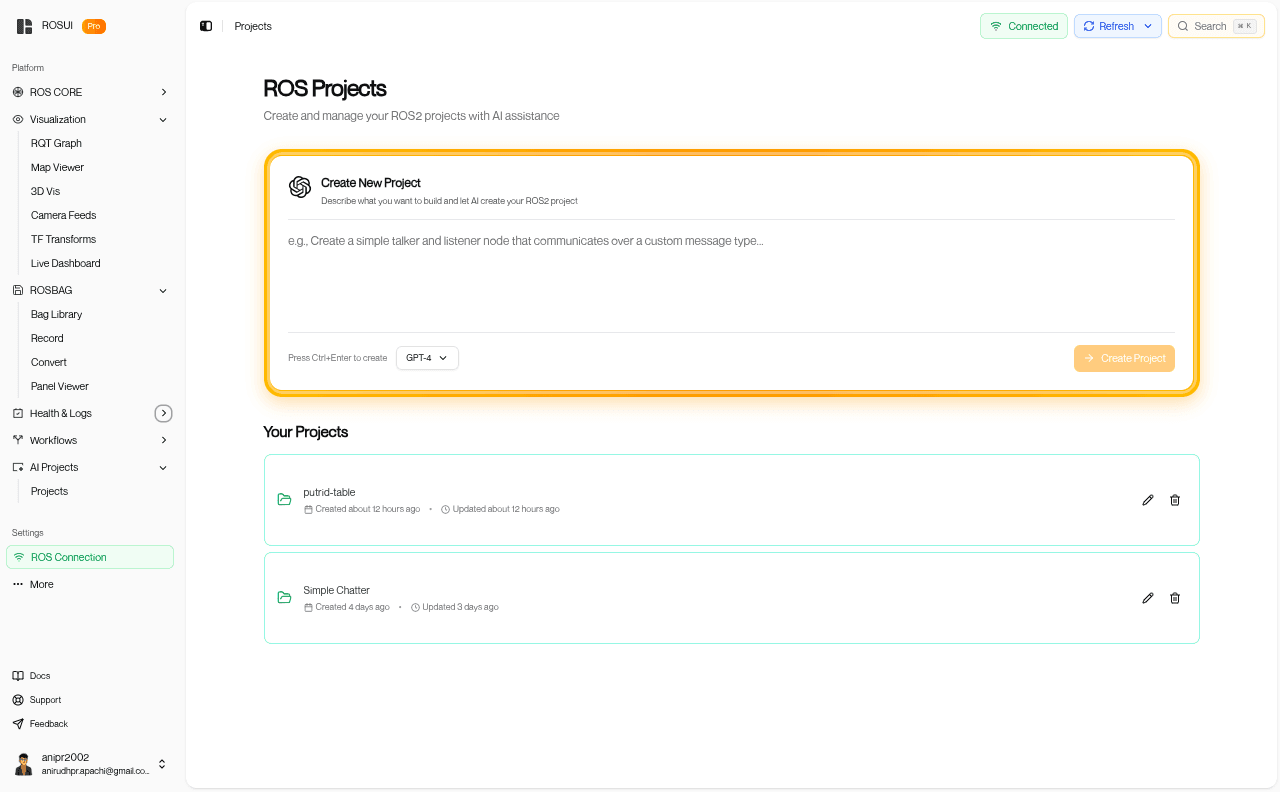
Describe what you want to build in plain English. Our AI generates complete ROS2 packages, launches nodes, and connects them to your dashboard via rosbridge—just like Lovable or Bolt.new, but for robotics. layers - it's all done for you.
Create and manage your ROS2 projects with AI assistance
Describe what you want to build and let AI create your ROS2 project
Press Ctrl+Enter to create
Your Projects
Rosui
Here's what I built for you: your simple talker node is all set up! You can run it using the launch file, which includes the rosbridge server, and it will start publishing messages on the "/chatter" topic.
Rosui
Hey there! I just set up the "my_talker" package for you. Now you can easily launch the talker node and the rosbridge server by running the provided command. You're all set to start chatting!

Turn your knowledge into revenue. Train a custom AI chat your clients will rely on and pay for.
